How to Check Student Permit Expiration Date

The LTO Student Permit is an essential document for a beginner to develop driving skills in the Philippines. The LTO Student Permit has a fixed validity of one year from issue date. So, you should know your student permit expiration date and be prepared to renew it on time.
The Land Transportation Office releases the physical copy of student permit that you must carry all the time. With a valid student permit, you can drive a motor vehicle under a license holder’s supervision. If your student permit is expired or about to expire then you must renew it first and then do your driving practice.
Where to Check LTO Student Permit Expiration Date
There are two ways to check your student permit expiration date, you can go with your convenient way.
Method-1: LTO Student Permit Expiration Date Check on Permit
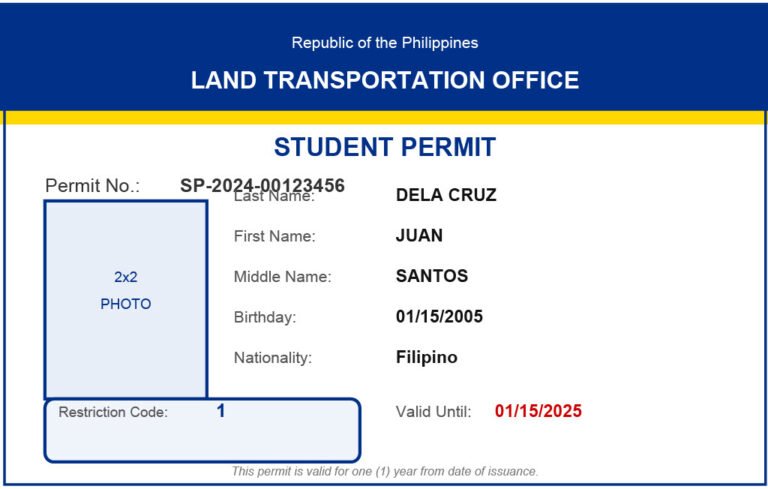
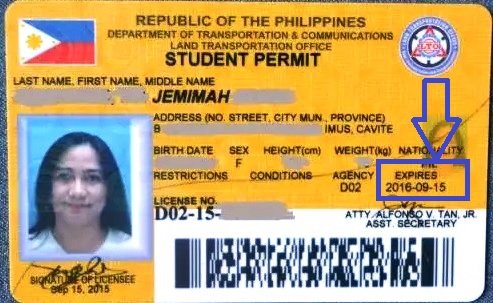
The expiration date is clearly mentioned on the student permit itself. If you want to know your student permit expiration date, then just take a look on your LTO student permit.
Here I provide an LTO Student Permit Sample for you. Check it to know the spot where the expiration date is mentioned on the permit.
Method-2: LTO Student Permit Expiration Date Check Online
When you apply for LTO Student Permit for first time, you must create an online account at LTMS Portal. After online registration, you can login to LTMS Portal to apply for a new student permit, student permit renewal, driver’s license, set an appointment at your desired LTO Office and do much more.
You can also access your student-driver’s permit number, status, expiration date and license type details at LTMS Portal. Kindly follow the steps given here to login to LTMS Account and check your student permit expiration date online.
#Step 1: Go to LTMS Portal and Login
You should open a web browser on your device and go to LTMS Portal at https://portal.lto.gov.ph. On the LTMS Portal Homepage, find out Login button and click on it.
#Step 2: Provide Required Info and Click Sign-In
In order to login to LTMS Portal, you need to enter your Registered Email and Password or your LTO Client Number and Password. The LTO generates a unique Client Number and sent it to you via email when you register first time at LTMS Portal.
Kindly enter your login credentials correctly, then enter the Captcha Code and finally click on Sign-In button to proceed.
#Step 3: Select Documents Option

After login, you can see a variety of options on screen, please select Documents option to continue.
#Step 4: Check Student Permit Expiration Date
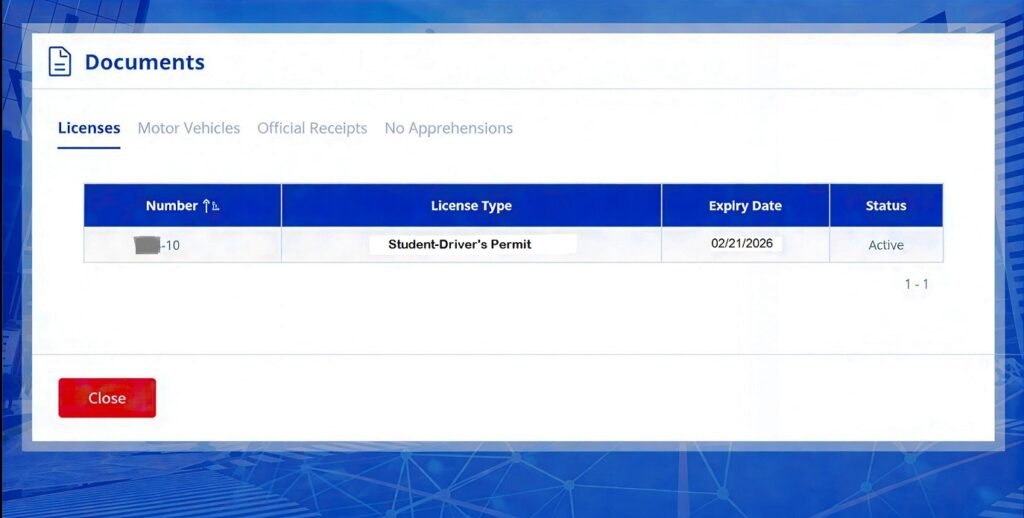
On Documents page, you can view your LTO Student-Driver’s Permit information. Here you can check your license type, license number, student permit expiration date and its status. The details should appear as under:
- Number – Your Student Permit Number
- License Type – Student-Driver’s Permit
- Expiry Date – Your Student Permit Expiration Date
- Status – Active
So, this is how you can check your LTO student permit expiration date online at LTMS Portal.
What to Do If My Student Permit is About to Expire
After checking student permit expiration date, you have realized that your permit is likely to expire soon. So, now you have to take the necessary action that depends upon your current situation.
If you have completed Practical Driving Course and ready to give Practical Driving Test:
- You should apply for Driver’s License if you have completed the Practical Driving Course (PDC) at an LTO Accredited Driving School and you are fully confident to give the Practical Driving Test.
If you have not taken Practical Driving Course yet and/or not ready to give the Practical Driving Test
- You should apply for Student Permit Renewal if you have not taken the Practical Driving Course (PDC) and/or you are not confident enough to give the Practical Driving Test.
What to Do If My Student Permit is Already Expired
When you checked the student permit expiration date, you came to know that your LTO student permit is already expired. It means that your student permit is not active anymore. Now you have to apply for student permit renewal or a new student permit depending upon the tame-gap between expiration date and renewal.
- You should apply for LTO student permit renewal if your student permit was expired between 1 day before to less than two years ago. The LTO accepts such renewal applications with a penalty of ₱50 to ₱100.
If your student permit was expired longer than two years ago
- You should apply for a New LTO student permit if your student permit was expired more than 2 years ago. The LTO may reject your renewal application if it was expired longer than two years back therefore I suggest you to submit a fresh application for new student permit.
So, you need to renew student permit or apply for full Driver’s License based on your situation and your student permit status.
Summary
The LTO student permit offers one year validity from its release date. I have explained above where and how you can check your student permit expiration date and what you can do after checking it.
The student permit is an official permission to drive a motor vehicle under supervision of a driver’s license holder in the Philippines. It helps to develop driving skills and get yourself ready for obtaining the Driver’s License.
If your student permit is about to expire, you can learn here How to Renew Student Permit in Philippines. For further queries, feel free to write down your words in the comment section given below.
FAQs
Is my student permit valid?
You need to check its expiration date to know if your student permit is valid or not.
What is my student permit validity?
Your student permit validity is one year from the issue date.
Where do I check LTO student permit expiry date?
You can check LTO student permit expiry date on the permit itself.
Can I check LTO student permit expiration online?
Yes, you can login to LTMS Portal to check LTO student permit expiration online using your phone or computer.